Job Management Software for Trades and Field Service Businesses
An example system for contractors whose work happens on customer sites: fencing, landscaping, grounds maintenance, installation and property maintenance. It follows a job from the first phone call to the invoice, and keeps the office and the vans looking at the same information.
Where trades admin usually falls apart
Most field service businesses do not lose money on the tools. They lose it in the gap between the office and the van: a quote that never got chased, a job that ran two days over without anyone noticing, an invoice raised three weeks late from a scribbled note.
The diary is the system
Work lives in a wall planner, a phone calendar and a group chat. Move one job and three people need telling, and one of them never gets told.
Quotes go out and go quiet
Nobody knows which quotes are still live, which were rejected and which are simply sitting unanswered. Work is lost by silence rather than by price.
Crews arrive without the full picture
The access code, the gate width, the customer's dog, what was actually quoted. All known by someone in the office, none of it on site.
Changes on site never reach the office
Extra work agreed with the customer at the gate gets done, gets forgotten, and never makes it onto the invoice.
Photos and sign offs live on phones
Before and after shots are spread across four handsets. Six months later, when a customer disputes the work, nobody can find them.
Nobody knows which jobs paid
Without time and materials recorded against the job, the next quote is priced on a feeling rather than on what the last one actually cost.
One job, from first call to payment
The example follows the path work actually takes through a field service business. The office screens and the on site screens show the same job from two different angles, which is the part generic tools tend to get wrong.
- Stage 1EnquiryCall or web enquiry logged with address, access notes and how urgent it is.
- Stage 2Site visitSurvey booked, measurements and photos captured while standing there.
- Stage 3QuotePriced from materials and labour, sent out, then chased automatically.
- Stage 4Scheduled jobAccepted work allocated to a crew and a day, with materials ordered.
- Stage 5On siteCrew updates progress, logs hours, adds photos and any extra work agreed.
- Stage 6Sign offCompletion recorded with customer signature and closing photos.
- Stage 7InvoiceRaised from what was actually done, including the extras, then tracked to payment.
Some businesses need a snagging stage before sign off, some run planned maintenance visits that never start as an enquiry at all, and some quote in stages for larger contracts. The workflow gets shaped around how your work really runs before anything is built.
What the example shows, and what a real build adds
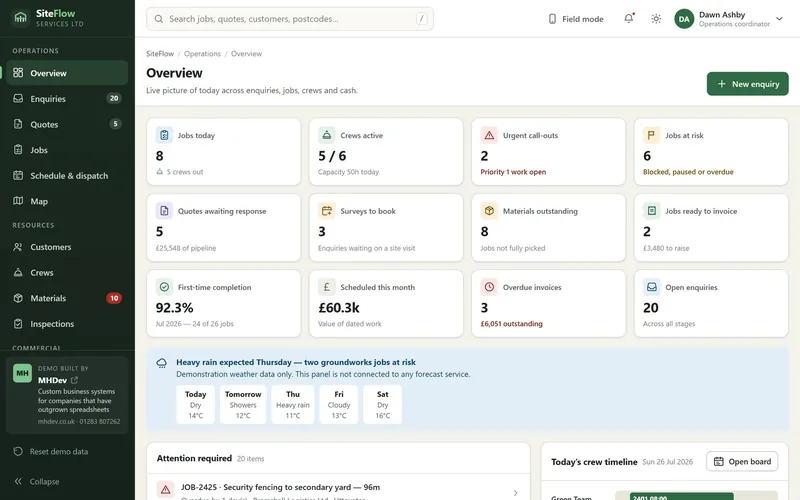
The interactive example covers the operational core: getting work in, getting it scheduled, getting it done and getting it invoiced. It is there to show how the information fits together, not to be a finished product.
Included in this example Clickable now
Everything below is in the demo you can open, running on fictional data.
- Dashboard of today's jobs, crews and alerts
- Enquiries and site visit booking
- Quotes with materials and labour lines
- Job records with full history
- Weekly crew schedule and allocation
- Job locations and area view
- Customer records and past work
- Crew and staff availability
- Materials and stock used on jobs
- Site inspections and completion checks
- Invoices and payment status
- Reporting on jobs, quotes and revenue
What a custom build could add Scoped per business
Common additions once the core system is running and earning its keep.
- Mobile app screens designed for use on site
- Offline capture that syncs when signal returns
- Customer signature and photo capture at sign off
- Automatic quote chasing and appointment reminders
- Accounting integration with Xero or QuickBooks
- Recurring maintenance contracts and service intervals
- Route planning across the day's jobs
- Van stock and equipment tracking
- Certificates, RAMS and compliance documents
- Customer portal for quotes, dates and documents
- Job costing that compares quoted against actual
- Subcontractor allocation and rates
Open it and click around
The demo shows how a custom system could keep the office diary, the crews' day and the invoicing in step with each other, so that a job cannot quietly go missing between the quote and the payment.
Worth knowing before you open it
This is a front end running in your browser on fictional sample data. Some buttons are for show and nothing you change is saved.
A system built for a real business is a proper application: a secure database, staff logins and permissions, reporting on your own live data, backups, and links to the software you already use. Treat this as a sketch of the workflow rather than a limit on what can be built.
Why I designed it this way
Field service software often assumes everyone is sitting at a desk. In reality one person in an office is holding the week together while four or five people are out in vans, and the two groups need completely different screens.
So the example is built around the schedule rather than around a record list. The week view is the centre of the system, because that is the thing an owner actually stares at every morning. Jobs carry their site notes, photos and agreed extras with them, so the crew has the context and the office gets the changes back. Quotes sit next to jobs rather than in a separate sales area, because in a trades business they are the same conversation a week apart.
The office layout is dense, the on site layout is not. That difference is deliberate.
Built with these businesses in mind
The example suits contractors running roughly two to fifteen crews, where work is quoted per job, carried out on customer sites, and currently held together by a diary, a phone and a good memory.
- Fencing contractors
- Landscaping and grounds maintenance
- Property maintenance
- Groundworks and driveways
- Electrical and plumbing firms
- Heating and installation engineers
- Cleaning and facilities services
- Any business quoting and scheduling site work
When custom software is the right call, and when it is not
There are decent off the shelf job management packages, and for a lot of trades businesses one of them is the sensible answer. It is worth being clear about which situation you are in before spending anything.
Off the shelf usually wins when
- You quote and schedule in a fairly standard way
- You want something running this month
- The team is small enough that a shared calendar still copes
- Per user pricing still works out cheap at your headcount
- You would rather spend the money on another van
Custom starts to make sense when
- You are paying per user for a package the crews refuse to use
- The real schedule lives in a spreadsheet next to the software
- Your pricing or contract structure does not fit standard fields
- The same job is entered into a diary, a quote tool and an accounts package
- You run maintenance contracts the software cannot represent
- Office admin is growing faster than the work is
Need something similar for your business?
I build custom dashboards, CRM tools and internal systems around the way a business already works, for contractors in Burton upon Trent, Derby, Staffordshire, Derbyshire and across the UK. Most trades projects start with quoting and scheduling, because that is usually where the money leaks.
Not sure what to ask for? The how it works section explains how a project runs from first call to launch.