Manufacturing Management Software and Production Dashboard
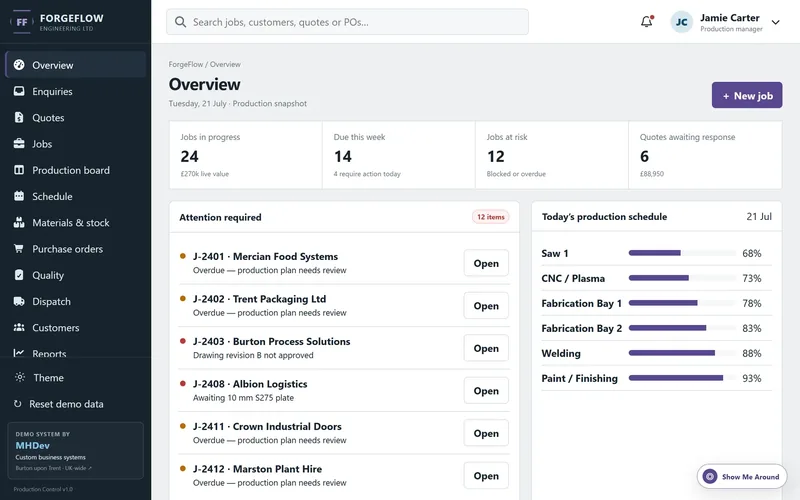
An example system for small and medium sized manufacturers who need a clearer way to see what has been ordered, what is being made, what is holding it up and what is going out of the door this week.
Where manufacturing admin usually breaks down
Very few smaller manufacturers are missing information. The information exists. It is just spread across a quoting spreadsheet, a whiteboard, a job bag on the shop floor and somebody's inbox, so answering a simple customer question means asking three people.
- Nobody can answer "when will it ship". Sales rings the office, the office walks to the workshop, the workshop checks the board. The customer waits a day for a date that was already known.
- Quotes live outside everything else. A won quote is retyped as an order, and the pricing assumptions behind it are lost by the time the job is being made.
- Production status is a whiteboard. It works until someone rubs a line out, or until you want to know what the workshop looked like three weeks ago.
- Stock is counted twice and trusted once. Material is reserved on paper, used without being recorded, and a shortage is discovered on the morning the job was meant to start.
- Delays are found late. A late delivery from a supplier only becomes visible when the job it was feeding is already overdue.
- Dispatch is tracked in a notebook. What went out, on whose van, signed for by whom, and whether it was invoiced, all sit in different places.
- The same figure is typed three times. Into the quote, into the order, into the invoice, with a fresh chance of an error at each step.
- Month end is rebuilt by hand. Someone spends a day in Excel producing numbers the system could have produced continuously.
One job, followed from enquiry to invoice
The example is built around the path a real order takes through a made to order manufacturer. Every screen in the system exists to serve one of these stages, and every record carries its history with it, so you can always see how a job arrived where it is.
- Stage 1EnquiryCustomer, drawings, quantity and required date captured in one place.
- Stage 2QuotationMaterials, labour and margin priced up, sent, then chased or revised.
- Stage 3Sales orderAn accepted quote becomes an order without retyping anything.
- Stage 4Works orderThe order is broken into jobs, scheduled against capacity and material.
- Stage 5ProductionStages are updated as work happens, with blockers flagged early.
- Stage 6Quality checkSign off recorded against the job, with any rework tracked properly.
- Stage 7DispatchDelivery note raised, goods booked out, stock adjusted automatically.
- Stage 8InvoiceInvoice raised from what actually shipped, ready for the accounts package.
No two manufacturers run exactly these eight stages. Some need a subcontract stage in the middle, some need goods in inspection, some quote in assemblies rather than parts. The stages are a starting point for a conversation, not a fixed template.
What the example shows, and what a real build adds
The interactive example deliberately covers the core operational loop rather than every feature a factory could want. It is there to show information design and workflow, not to be a product.
Included in this example Clickable now
Everything below is in the demo you can open, running on fictional data.
- Dashboard overview of orders, workload and dispatches
- Enquiries and quotations with revisions
- Sales orders and order lines
- Works orders with stages and progress
- Production schedule and capacity view
- Stock levels, raw materials and low stock flags
- Quality checks and sign off
- Dispatch and delivery tracking
- Customer and supplier records
- Search, filtering and status badges
- Reporting screens and activity history
What a custom build could add Scoped per business
Common additions once the core system is running and earning its keep.
- Accounting integration with Xero, QuickBooks or Sage
- Barcode or QR scanning on job travellers
- Shop floor terminals with large touch friendly screens
- Customer portal for order status and documents
- Supplier purchase orders and goods in booking
- Automatic emails on dispatch and order acknowledgement
- Document generation for delivery notes and certificates
- Certificate and material traceability records
- Machine or cell level scheduling
- Role based permissions across sales, production and management
- Mobile access for managers away from the office
- AI assisted quoting from previous similar jobs
Open it and click around
The demo shows how a custom manufacturing system could pull sales, production and dispatch into one interface, so that the person who picks up the phone can answer the question without leaving their desk.
Worth knowing before you open it
This is a front end running in your browser on fictional sample data. Some buttons are for show and nothing you change is saved.
A system built for a real business is a proper application: a secure database, staff logins and permissions, reporting on your own live data, backups, and links to the software you already use. Treat this as a sketch of the workflow rather than a limit on what can be built.
Why I designed it this way
Many smaller manufacturers do not need a full ERP platform, and the ones who buy one often end up using a tenth of it while still keeping the spreadsheet that actually runs the place.
So this example starts from the day rather than the feature list. The dashboard answers the three questions that get asked most often: what is late, what is being made today, and what is going out. Works orders carry their own history so nobody has to reconstruct why a job slipped. Stock sits next to production rather than in a separate module, because in a small factory those are the same conversation.
The layout is dense on purpose. Production staff would rather see thirty jobs at a glance than click through five pretty cards.
Built with these businesses in mind
The example is aimed at made to order and small batch manufacturers, typically between five and eighty staff, where the process is well understood by the people doing it but badly recorded by the tools they have.
- Fabrication companies
- Engineering and machining
- Fencing and gate manufacturers
- Metalwork and sheet metal
- Joinery and timber products
- Small factories and production units
- Made to order manufacturers
- Businesses replacing spreadsheets or a legacy system
When custom software is the right call, and when it is not
Custom is not automatically better. Plenty of manufacturers are well served by an off the shelf package, and if that is the case it is cheaper and faster to say so.
Off the shelf usually wins when
- Your process is close to a standard one
- You need it running in weeks, not months
- Nobody internally can spare time to shape a system
- The main need is accounting or payroll rather than production
- Budget is better spent on machinery or people right now
Custom starts to make sense when
- Staff have built workarounds because the software does not fit
- The process that really matters lives in a spreadsheet somebody guards
- The same information is typed into two or three systems
- You pay per user for a package where most of it goes unused
- Something about how you make or price work is genuinely unusual
- Growth is being held back by admin rather than capacity
Need something similar for your business?
I build custom dashboards, CRM tools and internal systems around the way a business already works, for manufacturers in Burton upon Trent, Derby, Staffordshire, Derbyshire and across the UK. Most projects start with the one part of the process that causes the most trouble, then grow from there.
Not sure what to ask for? The how it works section explains how a project runs from first call to launch.