Interactive examples

Business System Examples

See what software built around your business could look like. These are interactive examples of custom dashboards, CRM tools and management systems, each designed around the way a particular industry actually works.

Open any of them and click around. Nothing needs a login, nothing can be broken, and every record you see is fictional sample data.

These are illustrations of how a system could work rather than production builds. More on the difference below.

Available examples

Each example has its own page explaining the problem it solves, the workflow it follows and what a custom version could include, with a link through to the working system.

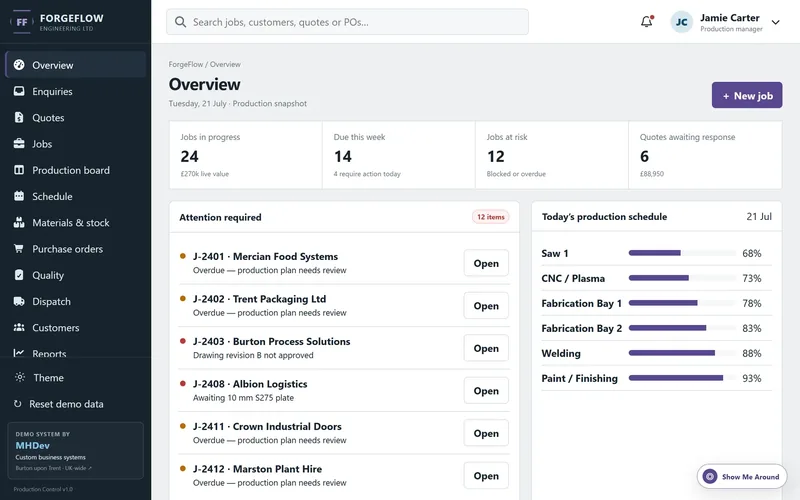
The manufacturing management example: an overview screen listing jobs in progress, jobs due this week, jobs at risk, works orders needing attention and today’s production schedule by work centre.
Manufacturing and engineering

Manufacturing Management System

Track an order from first enquiry through quoting, production and quality checks to dispatch, without the job living in three different spreadsheets.

  • Quotes
  • Works orders
  • Production
  • Stock
  • Dispatch
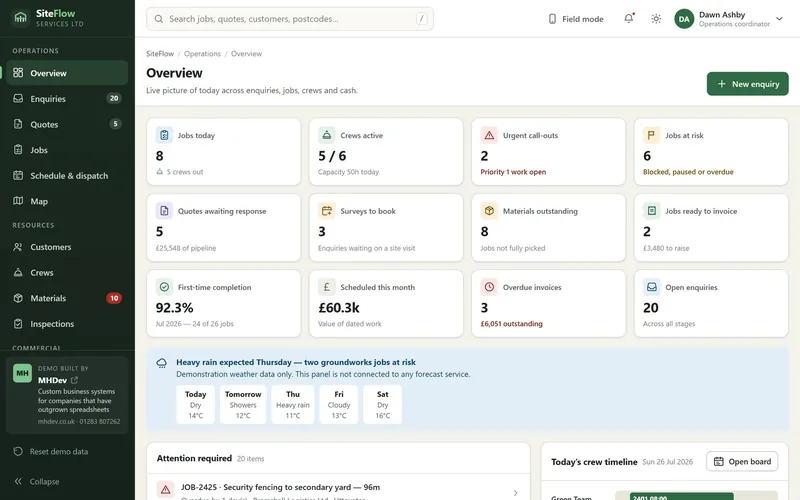
The trades job management example: a field operations overview showing jobs booked today, active crews, quotes awaiting response, overdue invoices and today’s crew timeline.
Trades and field services

Job Management Software for Trades

Enquiries, site visits, quotes, crew scheduling and invoicing in one place, built for contractors whose work happens on site rather than at a desk.

  • Enquiries
  • Quotes
  • Scheduling
  • Crews
  • Invoicing
Coming next

Industries lined up next

Each example is properly researched before it is built rather than reskinned from the last one, so they arrive one at a time. The industries below came out of looking at how real businesses around Burton upon Trent, Derby and the wider Midlands actually run, and what each of them would need a system to do.

Mortgage and insurance brokers

Broker CRM

Case tracking from first enquiry through fact find and application to completion, plus policy renewals and commissions.

Lead → fact find → application → offer → completion
Estate and letting agents

Property and Lettings CRM

Landlords, properties, applicants and tenancies alongside maintenance jobs, certificates and sales progression.

Landlords → properties → applicants → tenancies → maintenance
Recruitment and staffing

Recruitment CRM and ATS

Clients, vacancies and candidate pipelines, with compliance documents, availability, shifts and timesheets.

Clients → vacancies → candidates → placements → timesheets
Veterinary and dental

Practice Management Dashboard

Appointments and daily lists, patient records, treatment plans, recalls and reminders through to billing.

Appointments → records → treatment → reminders → billing
Garages and bodyshops

Workshop and MOT Management

Bookings and workshop capacity, job cards, parts ordering, technician allocation, advisories and service reminders.

Booking → job card → parts → technician → invoice
Training providers

Course and Certification Portal

Courses and bookings, delegates and attendance, assessment results, certificates and expiry chasing.

Enquiry → course → delegates → certificates → refreshers
Transport and warehousing

Transport and Stock Control

Job bookings, vehicle and driver allocation, warehouse picking, proof of delivery and stock movements.

Booking → warehouse → picking → delivery → proof of delivery
Hospitality and membership

Membership and Venue Operations

Memberships and payments, classes and attendance, reservations, function bookings, staffing and stock.

Members → bookings → classes → events → payments
Construction

Project and Contract Tracker

Estimates, subcontractor allocation, site milestones, labour and materials, variations and snagging.

Estimate → subcontractors → milestones → variations → invoice
If your industry is on this list and you would rather not wait for the example, get in touch and we can talk through what a system for your business would need to do.

Behind the examples

Why the examples are industry specific

Most software demos show the same dashboard with the words changed. That proves very little, because the hard part of a business system is never the charts. It is knowing which stage a job sits at, who is waiting on what, and which piece of information the person on the phone needs in front of them right now.

So each example starts from a workflow rather than a template. The manufacturing example is built around works orders and production capacity. The trades example is built around crews, site visits and what happens when a job overruns. The screens differ because the working day differs.

The sample data is fictional but deliberately realistic: believable company names, sensible quantities and prices, jobs at different stages, and a few things going slightly wrong, because that is what a real system looks like on a Tuesday afternoon.

What you are looking at

A browser based front end with sample data. It shows layout, workflow and information design. Some actions are for show and nothing is saved.

What a real build involves

A proper application with a database, secure staff logins, user permissions, real reporting, backups, hosting and integrations with tools you already use such as accounting software.

Where to start

Most projects begin with one workflow that is currently painful, not a full system. Read how a project runs or see what it costs.

Next step

Need something similar for your business?

I build custom dashboards, CRM tools and internal systems around the way a business already works, for companies in Burton upon Trent, Derby, Staffordshire, Derbyshire and across the UK. The first conversation is free and there is no obligation to go further.

Wondering whether AI fits into any of this? See AI workflow consulting for how that is handled separately.